
blog
Your cluster’s groups, with an end date
If your clusters’ RBAC is already written for your SSO’s groups, as of 0.46 kubelatch can put someone in one of those groups until a date you choose, and the bindings you already have apply to them in the meantime. With OIDC login, new people can also sign themselves up with their company e-mail. 0.47 polishes both, changes an API default and fixes a security issue: here’s what to check before you upgrade, and what kubelatch still can’t see.
The groups your cluster already knows
Take a kubeadm cluster with --oidc-*, where a RoleBinding gives the oidc:payments-devs group edit in the payments namespace. EKS, AKS and GKE do the same with each provider’s groups, each in its own format. Up to 0.45, kubelatch did its own thing. Each permission was a group of its own, such as kubelatch:ns:payments:developer, with a binding kubelatch wrote, and the apiserver’s audit log showed Ana under two names, oidc:ana@acme.com and user:ana.
0.46, out on 20 October, brings what the 0.45 post left for phase 1. The first piece is the native role, which names one to 20 groups the cluster already knows. Granting it puts the person in those groups for a while: as long as the permission lasts, the proxy sends them as Impersonate-Group and the cluster applies the bindings it already has. kubelatch writes no binding and no ClusterRole, and the moment the permission expires, it stops sending those groups. Revocation, approvals and the audit log work as with any other role.
So if Ana needs edit in payments until Friday, you no longer write a custom role that copies what edit allows, or add her to the directory group and make a note to take her out on Friday: you grant her a native role with oidc:payments-devs until Friday, and the permission expires on its own. When you create the role, you pick a cluster under Known in and kubelatch lists the groups its bindings name.
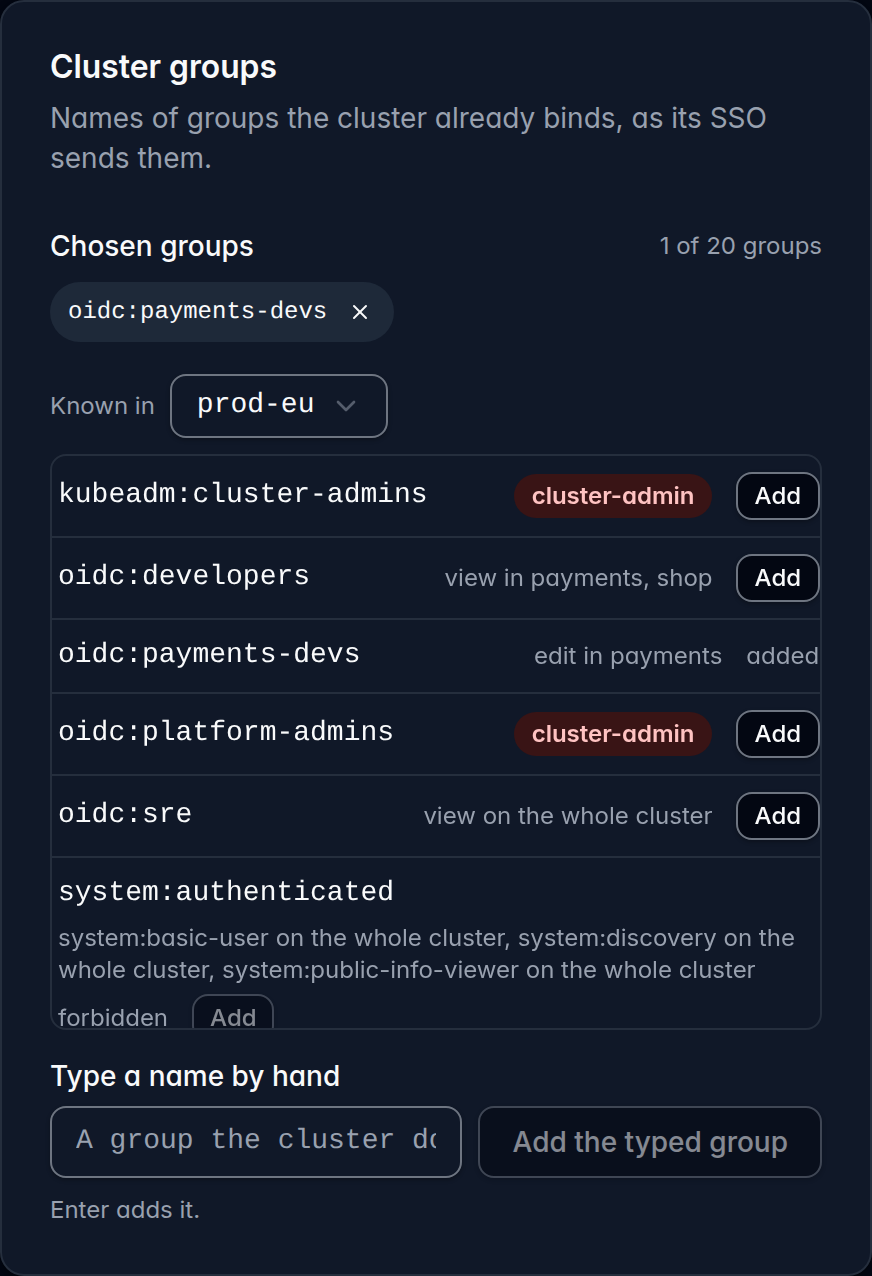
system: groups show as forbidden.Under the name your cluster uses
The other half of the change is the name each person comes in with. Each cluster now has an identity template where you set that name. With oidc:{email}, Ana is oidc:ana@acme.com whether she comes through kubelatch or straight through the cluster’s SSO, so the bindings that name her apply, and the apiserver’s audit log shows her under one name. The default, user:{login}, keeps everything as it was, and before you save another template, the preview shows the name each person will come in with.
In 0.46, a single account the template couldn’t name, such as one without a verified e-mail on a cluster that uses {email}, was enough to put the cluster in error. Not in 0.47: the cluster stays ready, everyone else keeps working, and that account gets a 403 that says what it’s missing.
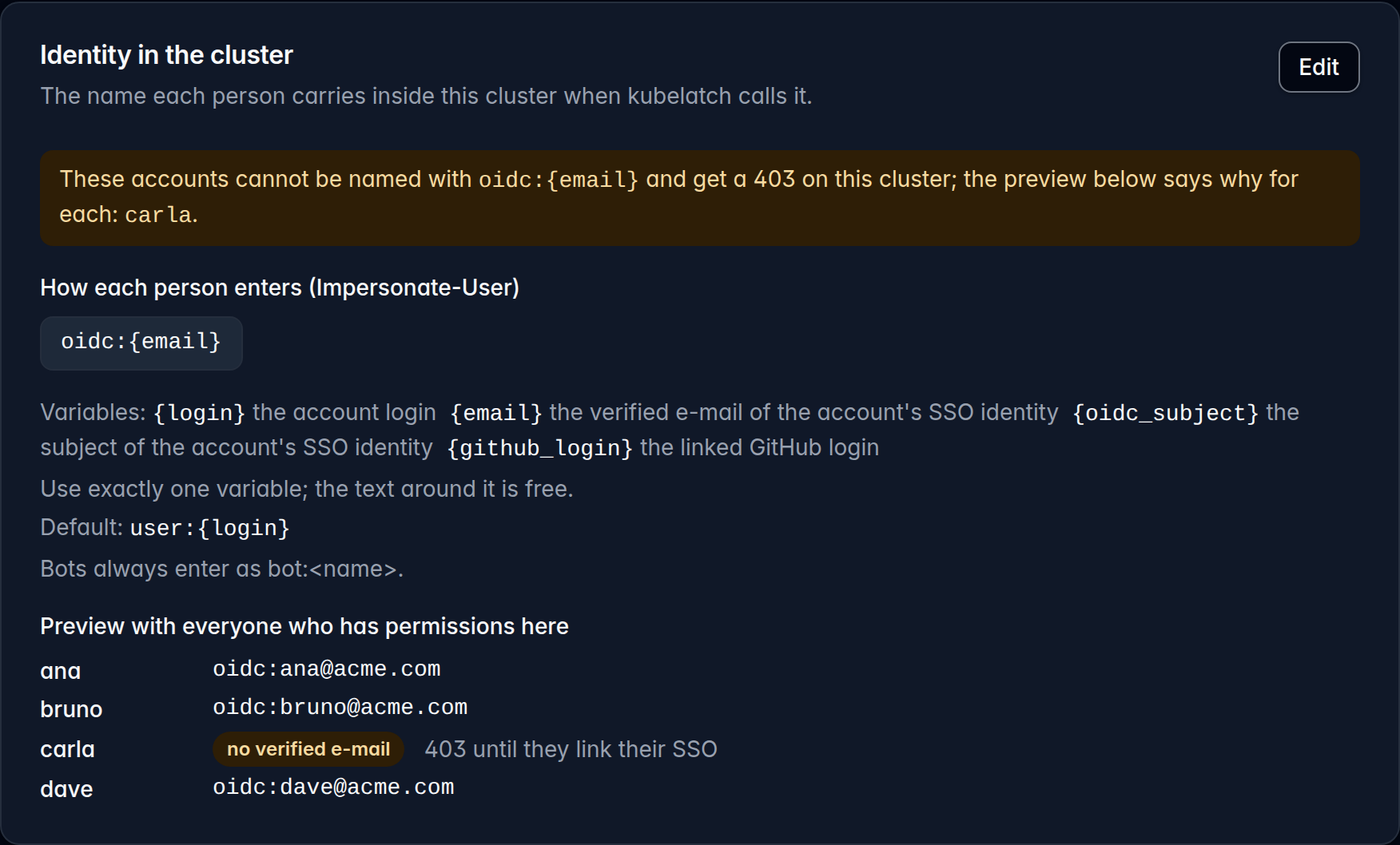
oidc:{email}: carla has no verified e-mail, so she gets a 403 on this cluster until she links her SSO account.cluster-admin, 8 hours at most
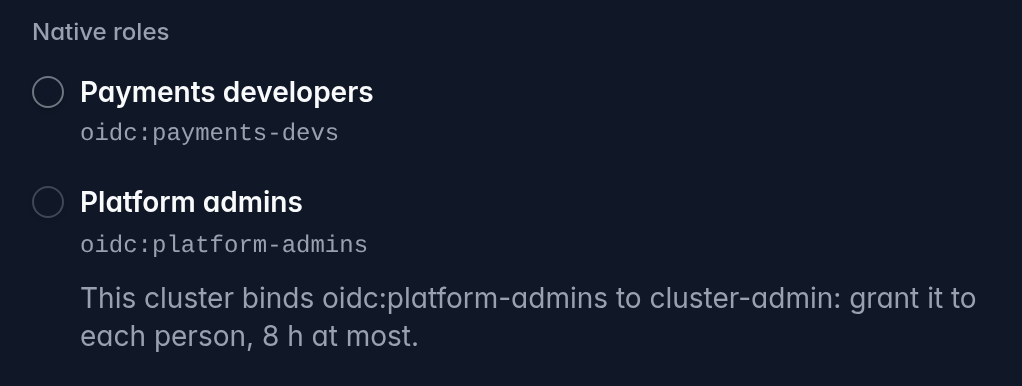
The cluster applies every binding it holds for a group or a user name, whoever wrote it. If it binds oidc:platform-admins to cluster-admin, a native role with that group grants cluster-admin; if it binds oidc:ana@acme.com, any permission Ana has on that cluster does, even a one-hour viewer. kubelatch doesn’t forbid it, because that’s how managed clusters usually give their administrators access, but it bounds it the way it bounds the cluster-admin role:
- That permission must expire within 8 hours. kubelatch checks this when granting by reading the cluster’s ClusterRoleBindings live, and refuses the permission if it can’t read them.
- It can’t be a group permission, since every future member would inherit it without that check. As of 0.47, the group’s form shows it disabled, with the reason, as soon as you pick the cluster.
- Every 10 minutes, and on every change, kubelatch reads the bindings again. If someone later binds one of those groups to
cluster-adminand a permission gives it without an 8-hour expiry, or a group permission gives it at all, that group drops out of what the proxy may impersonate and the cluster goes to Error, saying who and why. - AI agents never get a native role.
New people get in on their own
The second piece is sign-up without an invitation. With OIDC login, you add a domain under Domain access, on the Users page, and whoever signs in with a verified e-mail from that domain gets an account in the group you chose, with an optional expiry on that membership. They land in Home with the group’s permissions, and the Your connection card ticks off the steps to their first kubectl: installing the CLI and signing in, having a permission and trying it.
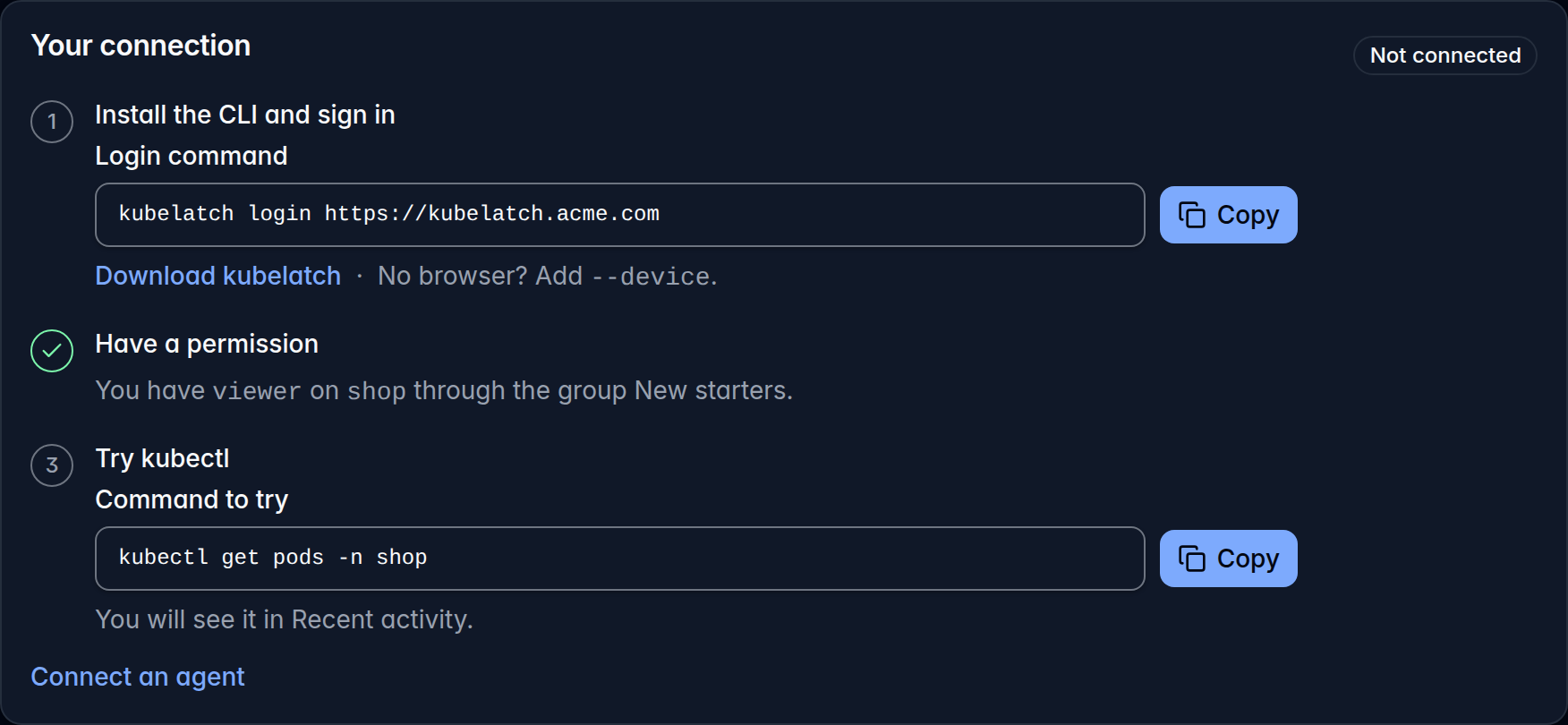
acme.com rule just signed up: the group’s permission is there, with two steps to go.If their domain has no rule, or the rule can’t create the account, they land on Ask to join and can send a request. An administrator approves it under Users, with a group, a direct permission or nothing, or denies it with a note only administrators see. Both paths respect Free’s limit of five people and are recorded in the control log.
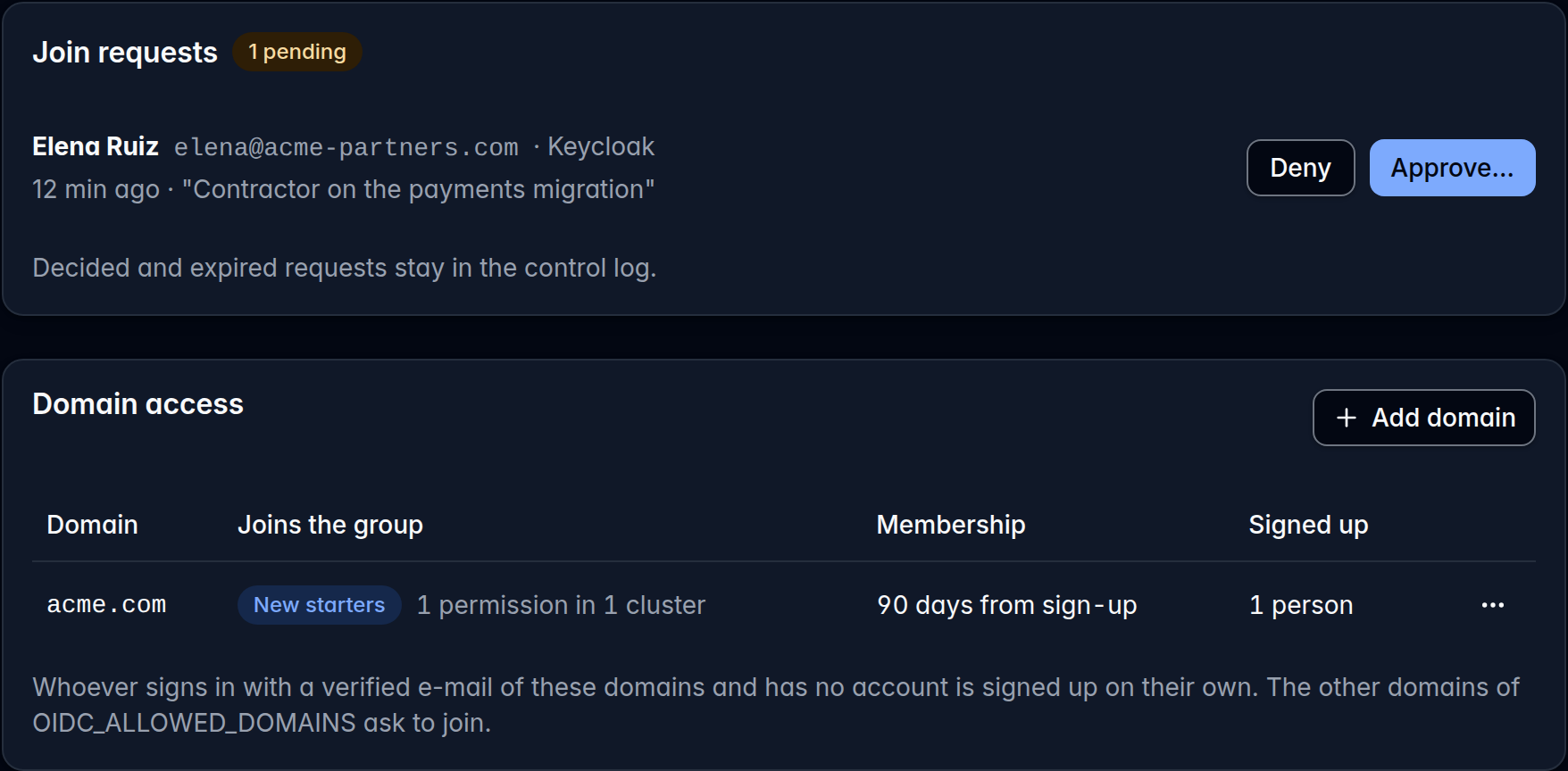
acme.com e-mail.One caution: a rule hands the group’s permissions to anyone in the company on their first sign-in. Point it at a group with a modest role, such as viewer on the namespaces everyone uses, and grant the rest by hand. And since logins go first come, first served across every allowed domain (bob@contractor.io may get the bob your bindings meant for bob@acme.com), if a cluster’s template uses {login} and its bindings name users, switch to one with {email}.
Before you upgrade to 0.47
0.47 came out on 21 October and fixes a medium-severity security issue: someone able to intercept kubelatch’s outgoing connections (to your identity provider, GitHub, the mail service or a cluster) could get kubelatch to accept a forged certificate from a certificate authority that is no longer trusted. 0.47 is built with Go 1.26.10, which fixes it. Earlier releases are affected, so it’s time to upgrade; check these first:
- A permission created through the API without
expires_atnow expires after 30 days, as in the web interface; until now it never expired. A script that relied on that must now send"never_expires": true. - Reload any kubelatch tabs you have open: a page loaded before the upgrade sends Never as a 30-day permission.
- Native roles need the current bootstrap manifest. If the cluster’s page says its bootstrap is v1, follow Update the bootstrap.
- With two or more replicas, finish the rollout before you change a cluster’s template or add a domain; otherwise the old replica and the new one undo each other’s work on every pass.
And when you sign in, each provider’s button shows its logo; if your issuer is on your own domain, choose the logo with OIDC_ICON (config.oidc.icon in the chart).
What this does not solve
- kubelatch only sees RBAC, and for the 8-hour rule, only ClusterRoleBindings to the ClusterRole
cluster-admin: not a ClusterRole by another name that grants as much, nor what GKE’s IAM, Azure RBAC on AKS or EKS access policies grant. Cluster SSO by provider shows how each one names its groups. - What comes in straight through the cluster’s SSO doesn’t go through kubelatch: kubelatch can’t give it an end date, and it isn’t in kubelatch’s audit log.
- Offboarding is still on you. Removing a domain rule withdraws the memberships it created but keeps the accounts, and your provider doesn’t tell kubelatch who left: Disable their account.
- kubelatch is still in public preview: some pieces are missing, only the latest release is supported, and there’s no stability commitment between versions yet, as 0.47’s API change shows.
Try it
If you already run kubelatch, read the release notes and upgrade to 0.47 with Upgrade kubelatch. Then kubelatch on top of the SSO you already have explains when a native role fits and when a template does, and Native roles has the steps to create your first one. All of this works the same in Free and Pro.
If you don’t have it yet, the local tutorial sets it up on your machine with a throwaway kind cluster in about fifteen minutes, plus the first downloads.
kubelatch is developed at Picaporte Labs, in Spain. If anything doesn’t match what you see, write to me at hola@picaportelabs.com or hello@kubelatch.com.