
blog
One permission for all of staging
When you give people access to several clusters, every permission is granted one cluster at a time, and the cluster you register next month goes without until someone remembers. As of 0.60 you can put clusters in environments and tag them with labels, and with Pro grant one permission on a whole environment or label, with a cap on how long access lasts in each environment. 0.59, meanwhile, lets you enroll a new cluster by signing in to your identity provider, and no admin kubeconfig changes hands. The example throughout is a team with four prod clusters and two staging ones, and the one thing a permission on a set never hands out is privileged access.
All of staging, one permission
The team runs two staging clusters, staging and staging-eu, and four for prod. Until now, giving someone developer in staging's web namespace meant two permissions, one per cluster, and a third staging cluster arrived with none. With 0.60, out on 7 November, you create the environment staging, put both clusters in it and, when granting, pick An environment under Where. The form lists which clusters are in it today, and the preview says how many the permission reaches. What you grant is a single permission that follows the environment: a cluster you put in staging a month from now gets it right away, and one you take out loses it.
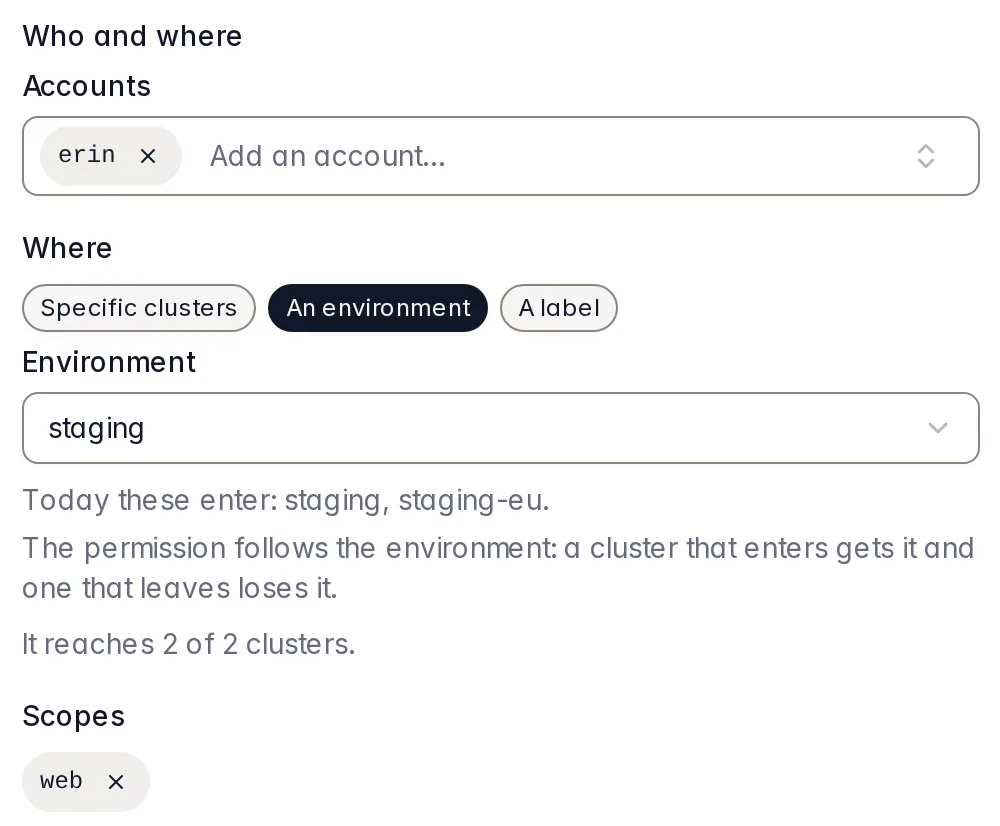
staging environment: the form says which clusters are in it today and how many the permission reaches.Labels work the same way. A label is a key: value pair on a cluster, team: payments or region: eu, like the ones in Kubernetes, and a permission on team: payments reaches every cluster that carries it, whatever environment each one is in, as long as that environment's maximum allows its expiry. In Permissions, erin's permission on staging is a single line, developer in web, 2 of 2 clusters, follows the environment, and it expands into one line per cluster with its expiry.
On each cluster of the set, the permission goes through the same checks as one granted there by hand: the namespace exists and enforces the Pod Security level the role needs, and the environment's rules accept its expiry. Where it fails one, the line says No effect and why, and the permission holds on the other clusters. Where the role, or the name the cluster knows the person by, is privileged, the permission never reaches that cluster, whatever its expiry. A set grows on its own, so privileged access never comes through one: whoever needs it gets it by hand, on that cluster, for 8 hours at most.
Seven days on prod
With Pro, an environment can also carry two rules: a maximum lifetime and a default expiry for the permissions of people and groups on its clusters. On prod, say 7 days at most and 1 day by default. From then on, the grant form on a prod cluster proposes 1 day and no longer offers Never or anything past 7 days, and the API turns down anything longer, too. No person keeps permanent access to production.
A maximum applies to the permissions that already exist, too. Save 7 days where there was no cap, and kubelatch cuts every active permission that ends later, or never ends, and shows you the list before saving: "Cuts 19 permissions of 14 people to Nov 8, 10:04 AM. Nothing is lengthened and bots do not change", with who holds each one, the role, where, and the end before and after. Relaxing a rule later lengthens nothing: each permission keeps the end it has.
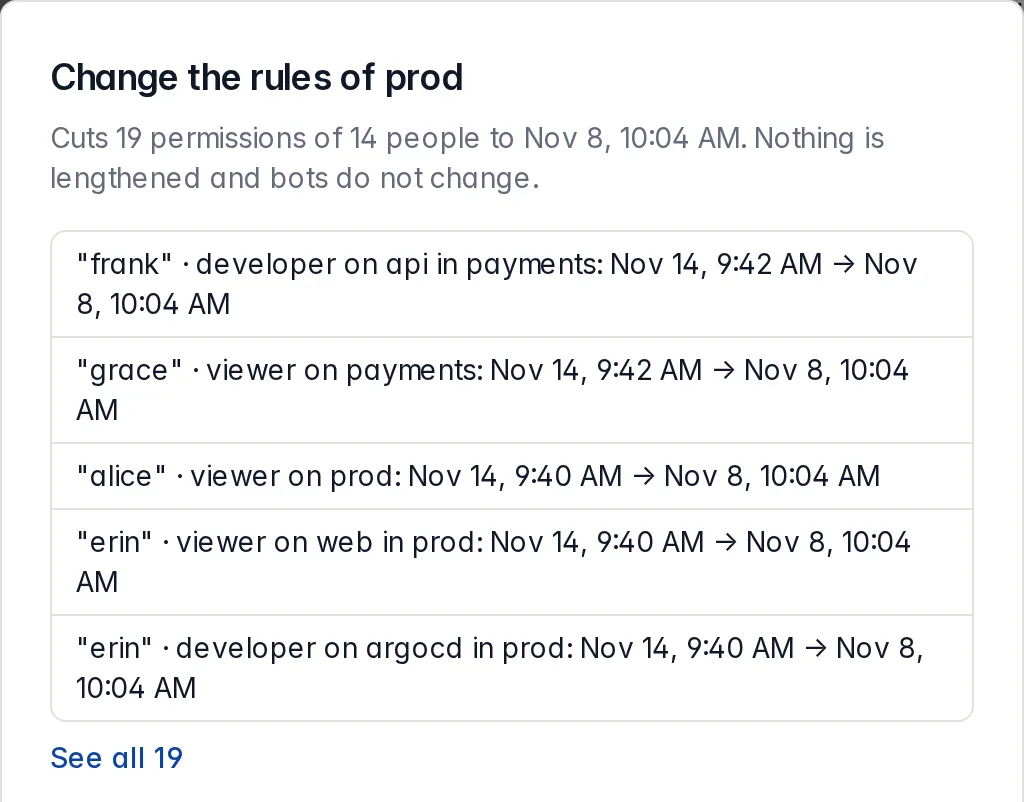
prod's maximum: the confirmation lists which permissions it cuts and their new end, before you save.Rules don't bind bots: a bot keeps its default of 30 days and may have no end date, so one that needs permanent access to prod gets it with a direct permission. An AI agent acting for a person never outlasts that person's permission.
Moving a cluster to another team
If staging-eu moves from the shop team to the payments team, you change its label from team: shop to team: payments under Environment and labels on its page. Before saving, kubelatch tells you which permissions that cluster stops receiving and which ones it starts to receive: dave's permission on team: shop stops reaching it, and frank's on team: payments starts to. If you also move it into an environment with a maximum, the same confirmation lists what it cuts. Every save leaves a row in the control log, with the environment and labels before and after.
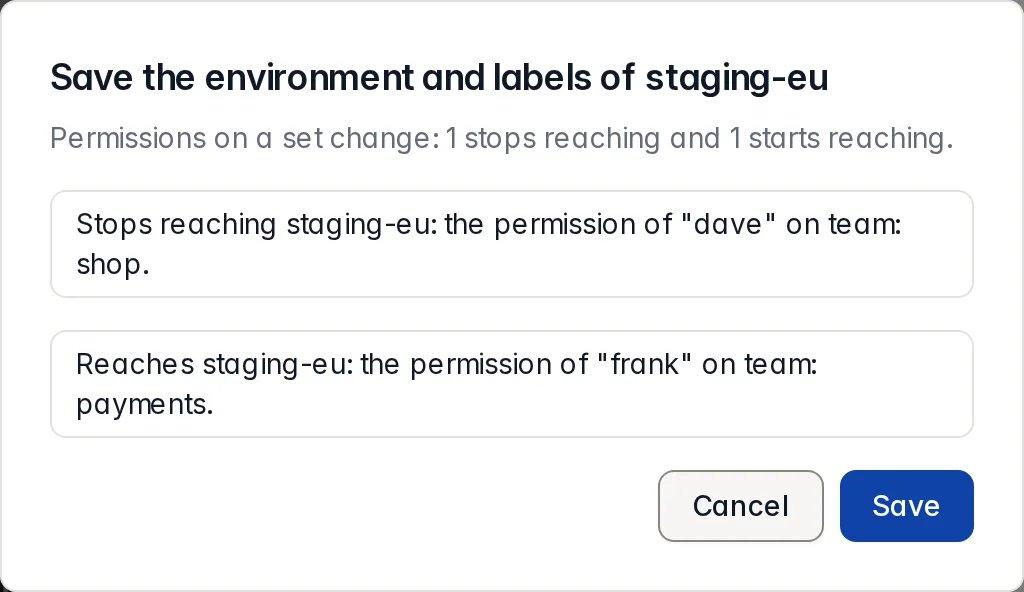
staging-eu to another team: the confirmation says which permission it loses and which it gains.A new cluster, with no kubeconfig
Before you can grant anything on a cluster, you enroll it, and up to 0.58 that meant running a command with the cluster's admin kubeconfig. As of 0.59, out on 4 November, if kubelatch has OpenID Connect sign-in on and your account is linked to it, the cluster's page offers With my identity (Keycloak), under your provider's name. You paste the API server URL and its CA, neither of which is secret (a read-only command prints them, and the EKS console shows both on the cluster page), and the panel shows each certificate's fingerprint so you can compare it. Paste a whole kubeconfig and the field wipes itself at once, and nothing is sent; kubelatch neither needs it nor reads it. It was still on the page for an instant, though: treat that credential as exposed to your browser's extensions.
Before you go, you see who you sign in as, where it applies, the whole manifest and what happens to your token: it is used only for this and is not stored. When you come back from the provider, kubelatch asks the API server who you are and checks that you can create everything in the manifest, applies it, waits for the two ServiceAccount tokens, stores them encrypted and discards yours, which never reaches the database, an event or a log line. The cluster's page says so in as many words: "Enrolled with your identity. The API server saw you as oidc:ana@acme.com". Both audit logs, the cluster's and kubelatch's, name the same person.
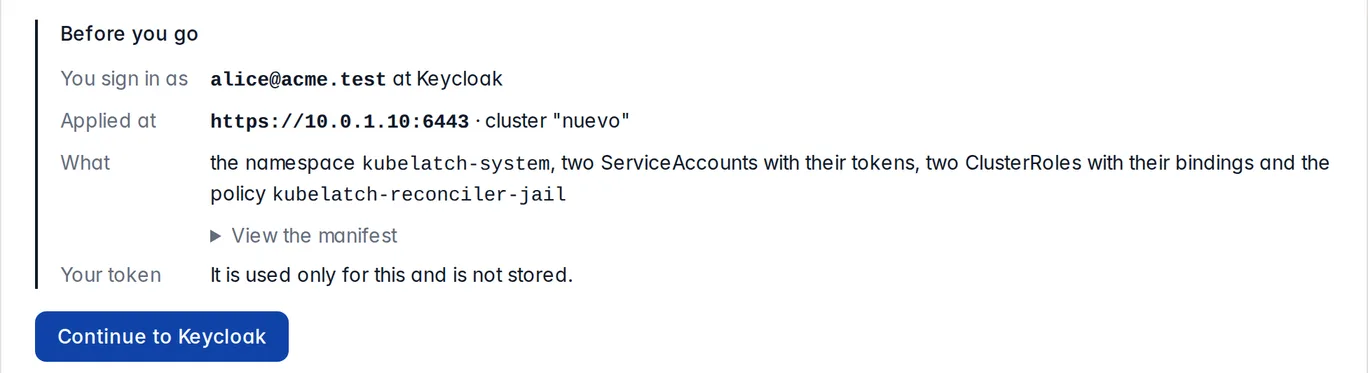
Re-enrolling a cluster reuses the address and CA it already has. For the cluster kubelatch itself runs in, the chart mounts the root CA that Kubernetes publishes in every namespace, so there's nothing to paste. The catch is that the cluster already has to accept your provider's tokens issued for kubelatch's client ID: kubeadm, k3s, Talos, RKE2, DOKS and EKS can; AKS, GKE and EKS with IAM Identity Center alone stay on the script, which still works for every cluster.
With many clusters
The team in the example has six clusters, and the third staging cluster takes it past that. 0.58, out on 1 November, had readied Permissions for exactly this: past six clusters it opens on By cluster, the ones in error first and, for each, who has access and until when. When someone leaves the team, Remove all permissions… under By account revokes their direct permissions and takes them out of their groups in one step; the account stays, to be disabled from its page. The same release gave each cluster's page its three tabs, a Needs attention that says who each problem locks out and what to do, and the Operations page, with who works on your clusters and what stands out; it's all in the 0.58 notes.
What this does not solve
- A permission on a set never grants privileged access, and
cluster-adminis never granted on a set: both stay personal, per cluster and capped at 8 hours. - Rules bind people and groups, not bots, and a cluster with no environment has no rules: its permissions keep whatever expiry they have.
- Environments and labels are in Free. Setting rules and granting or extending a permission on a set need Pro. What's saved keeps working without Pro: rules keep cutting and permissions keep following their sets; revoking, removing rules and deleting an environment never need Pro.
- Enrolling with your identity only works when the cluster already accepts your provider's tokens for kubelatch's client ID. kubelatch can't know that before you sign in: if the API server rejects the token, the panel says so and sends you to the script.
- kubelatch is still in public preview: only the latest version is supported, and there's no stability commitment between versions yet.
Try it
If you already run kubelatch, read the release notes and update with Upgrade kubelatch. Then Environments and labels has the steps to create your first environment, set its rules and grant on it, and Enroll with your identity says what your cluster has to trust before it works.
If you don't have it yet, the local tutorial gets it running on a kind cluster in about 15 minutes, plus however long the images take the first time.
kubelatch is developed at Picaporte Labs, in Spain. If anything doesn't match what you see, write to me at hola@picaportelabs.com or hello@kubelatch.com.